
Kaplan Meier is commonly used in survival analysis, where the goal is to measure how much time passes before a given event occurs. A typical example from medical research is to measure the fraction of patients living for a certain amount of time after treatment, e.g., survival rates for patients with cancer. The timeline is shown on the x-axis, and the survival function is shown on the y-axis. Individuals in whom the event did not occur are “censored” when the final observation time point occurs and thus are not “at risk” from this time point. Individuals in whom the event occurs (e.g., death) are displayed by a decline in the curve.
To perform a Kaplan Meier analysis, your dataset should contain a categorical variable describing the event of interest (e.g., alive/dead) and either a start date variable and an end date variable (recommended) or a numeric variable with the time until the event of interest occurs. However, this later analysis removes entries with a missing value, i.e., where no event has occurred.
From the analysis window, click "+ New analysis" and choose "Kaplan Meier" from the dropdown menu.
In the "Parameters" card, select "Data model", and set the duration variable or time range.
Time range (recommended): Choose a start date variable and an end date variable, which are used to calculate the duration. Then, select the time unit (days, weeks, etc.) for the x-axis.
Duration variable: Choose "Duration variable" if you have a numerical variable describing the time to the event.
Set the event variable and select which values represent your event(s) of interest, e.g., death and hospitalisation (it is possible to select multiple values representing an event). If this event data has missing values, these will be removed from the analysis. So, for example, if you are interested in “time to death”, ensure that the variable has “dead” and “alive” entered, not just “dead”.
For the time range data model, choose whether you want to use a specific end date for censoring by filling out the “End date censoring” or define which variable should be used for censoring (“Censor variable”). You can find more information about censoring below.
If you want to display separate curves for different groups in your material, you can choose this under "Groups". The grouping variable can be categorical or numeric (without decimals). When using "Single series" as the data model, grouping variables can be chosen from the main or series levels and can be categorical, numeric (without decimals), or unique.
In the “Formatting” card, you can switch off censoring ticks, change between category values or labels, and choose whether to display chart legends on your figure.
You can apply filters to the dataset to analyse subgroups (optional).
Export your results (Optional)
Confidence intervals
You can activate the "Confidence intervals" toggle switch at the bottom of the "Parameters" card if you want the 95 % confidence interval to appear in your curve.
Numbers at risk
You can activate the "Numbers at risk" toggle switch to display how many subjects are counted in the denominator at different time points. (Subjects who have reached the event, dropped out, or disappeared from the study for other reasons (means: have no more registered events after this time point, but you do not know the current status of the subject = censored data) are not counted as “at-risk”.) The numbers at risk and the time points are displayed under the curve.
Log-rank test
The log-rank test is a hypothesis test that compares the survival probabilities between two groups. The test is only available when you have chosen a categorical variable with two values (two groups) in your Kaplan Meier set-up. If you want to compare two groups within a variable that contains more than two values, you must use the filter function and select only the two values (groups) you want to compare (See “Add filters for analysis”). The calculated p-value describes the probability that the difference between the two groups’ survival rates is coincidental, given that the null hypothesis is that there is no difference between the groups.
Activate the toggle switch next to "Log-rank test" in the "Parameters" card. The result is shown beneath the figure.
Censoring
For the time range model, if the end date is missing, the duration between the start and the end cannot be computed. Therefore, selecting a “Censor variable” or an “End date censoring” value is possible. This example explains how it works.
Example:
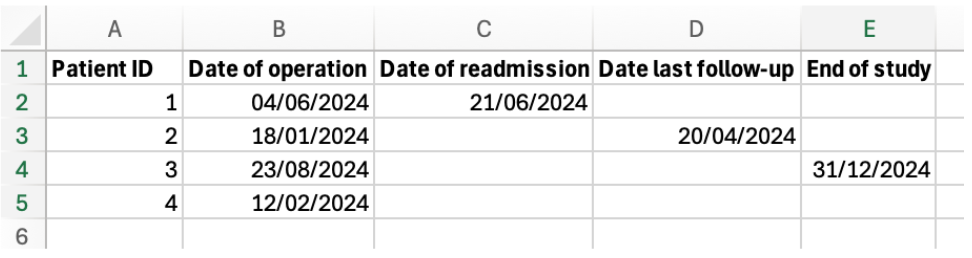
- Start date = Date of operation - End date = Date of readmission - Censor variable = Date last follow-up - End date censoring (this is a value, not a variable) = End of study
Patient 1: Start date and end date are filled out. This patient will not be censored. Patient 2:Start date is filled out, but the end date is missing. However, the censor variable (“Date last follow-up”) has been filled out, so this patient will not be censored. Patient 3:The start date is filled out, but both the end date and censor variable are missing. However, we have defined an end date of censoring (“End of study”), so this patient will not be censored if this value is filled out in Ledidi. Patient 4:Only the start date has been filled out, but all other variables are empty, and no end date of censoring has been defined. This patient will be censored.
It is therefore crucial to use a censoring variable or set a censoring date for entries in which the event did not occur (as often the “end date” variable will be empty in this case). Otherwise, the analysis will not be able to censor these individuals correctly.